
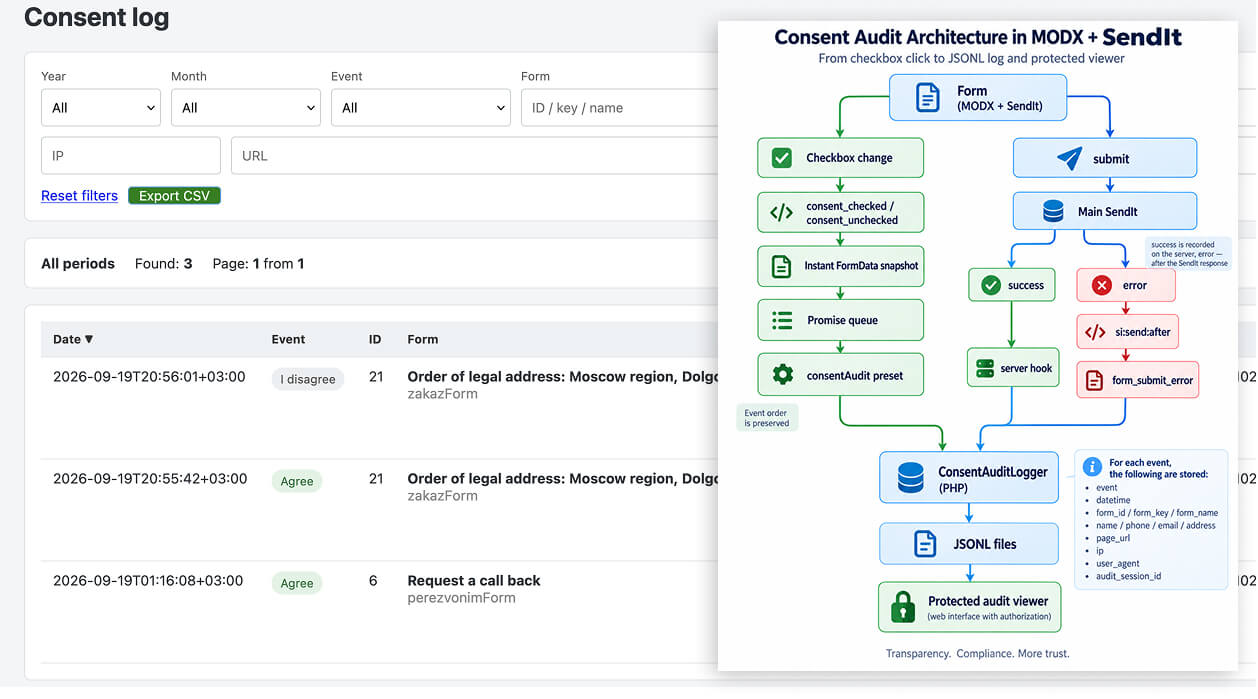
A simple “I agree to the processing of personal data” checkbox is sometimes not enough. In some projects, you may need to technically record what actually happened with the form: when the user checked the box, when they unchecked it, whether the form was eventually submitted, and whether that submission completed successfully.
This requirement came up on a website running MODX Revolution 2.8.x with SendIt 2.8.x.
The goal was to add consent auditing without significantly changing the existing form system.
The final implementation recorded four types of events:
consent_checked
consent_unchecked
form_submit_success
form_submit_error
For every event, the system stored the form data, page URL, form identifier, IP address, User-Agent, and a shared `audit_session_id` that made it possible to link multiple actions from the same user into a single sequence.
Let’s look at the architecture and the most interesting problems that had to be solved.
The Task
The website already had working SendIt forms.
A simplified version of one of them looked like this:
<form
    data-si-form="callbackForm"
    data-consent-audit
    data-audit-name-field="name"
    data-audit-phone-field="phone"
>
    <legend>Request a callback</legend>

    <input type="hidden" name="formId" value="6">

    <input type="text" name="name">
    <input type="tel" name="phone">

    <label>
        <input
            type="checkbox"
            name="privacy"
            data-consent-checkbox
        >
        I agree to the processing of my personal data
    </label>

    <button type="submit">
        Submit
    </button>
</form>
The goal was to obtain an event history similar to this:
14:03:12 consent_checked
14:03:18 consent_unchecked
14:03:24 consent_checked
14:03:31 form_submit_success
But simply knowing the event timestamp was not enough.
The form state had to be stored exactly as it existed at the moment of each event:
event
datetime
form_id
form_key
form_name
name
phone
email
address
page_url
ip
user_agent
audit_session_id
And that introduces the first important problem.
Why You Should Not Read the Form Only When the AJAX Request Is Sent
Suppose the user quickly performs three actions:
checked
unchecked
checked
If every event immediately launches an asynchronous request, there is no guarantee that the requests will finish on the server in the same order.
Even worse, the user may change their name or phone number while a previous audit request is still waiting to be sent.
That means two things are important:
- the data must be captured immediately when the event occurs;
- the audit requests should preferably be sent sequentially.
The resulting flow looks like this:
Event
   ↓
FormData snapshot
   ↓
Queue
   ↓
SendIt
   ↓
Audit preset
   ↓
PHP logger
   ↓
JSONL
Adding Dedicated Data Attributes
I did not want the JavaScript to depend on a hard-coded field name such as:
form.querySelector('[name="phone"]')
because another form might use:
phone
telephone
tel
contact
user_phone
A better approach is to place the configuration directly on the form:
<form
    data-consent-audit
    data-si-form="callbackForm"
    data-audit-name-field="name"
    data-audit-phone-field="phone"
    data-audit-email-field="email"
    data-audit-address-field="address"
>
Now the same JavaScript can handle many different forms.
For a form with a single “Phone or Email” field, you can use:
data-audit-contact-field="contact"
and determine the type of value programmatically:
function getAuditContacts(form, getValue) {
    let phone = '';
    let email = '';

    if (form.dataset.auditPhoneField) {
        phone = getValue(form.dataset.auditPhoneField);
    }

    if (form.dataset.auditEmailField) {
        email = getValue(form.dataset.auditEmailField);
    }

    if (form.dataset.auditContactField) {
        const contact = getValue(
            form.dataset.auditContactField
        ).trim();

        if (contact.includes('@')) {
            email = contact;
            phone = '';
        } else {
            phone = contact;
            email = '';
        }
    }

    return { phone, email };
}
This makes the auditing layer independent of the exact structure of a particular form.
Event Delegation Instead of Attaching a Handler to Every Form
Forms on a website may be loaded dynamically—for example, inside a modal window that appears after the page has already loaded.
So instead of:
document
    .querySelectorAll('[data-consent-checkbox]')
    .forEach(...);
it is better to use event delegation:
document.addEventListener('change', (event) => {
    const checkbox = event.target;

    if (
        !checkbox.matches?.(
            'input[type="checkbox"][data-consent-checkbox]'
        )
    ) {
        return;
    }

    const form = checkbox.form;

    if (
        !form ||
        !form.hasAttribute('data-consent-audit')
    ) {
        return;
    }

    sendAudit(
        form,
        checkbox.checked
            ? 'consent_checked'
            : 'consent_unchecked'
    );
});
Now the handler automatically works for forms added to the DOM later.
Capture the Form State Immediately
A key principle is that `FormData` should be created at the moment the event occurs, not later when the actual AJAX request is executed.
For example:
function getFieldValue(form, fieldName) {
    if (!fieldName) {
        return '';
    }

    const formData = new FormData(form);
    const value = formData.get(fieldName);

    if (
        value === null ||
        value instanceof File
    ) {
        return '';
    }

    return String(value);
}
Then we build the audit payload:
function buildAuditData(form, eventName) {
    const params = new FormData();

    params.set('audit_event', eventName);

    params.set(
        'form_id',
        getFieldValue(form, 'formId')
    );

    params.set(
        'form_key',
        form.dataset.siForm ||
        form.dataset.siPreset ||
        ''
    );

    const legend = form.querySelector('legend');

    params.set(
        'form_name',
        legend
            ? legend.textContent.trim()
            : ''
    );

    params.set(
        'audit_name',
        getFieldValue(
            form,
            form.dataset.auditNameField
        )
    );

    const contacts = getAuditContacts(
        form,
        (name) => getFieldValue(form, name)
    );

    params.set(
        'audit_phone',
        contacts.phone
    );

    params.set(
        'audit_email',
        contacts.email
    );

    params.set(
        'audit_address',
        getFieldValue(
            form,
            form.dataset.auditAddressField
        )
    );

    params.set(
        'page_url',
        window.location.href
    );

    return params;
}
So after:
const params = buildAuditData(form, eventName);
we already have a fixed snapshot of the form state.
If the user changes the phone number 100 ms later, the previous audit record will not change.
Why a Promise Queue Was Needed
The next problem is event ordering.
If you simply do this:
sendRequest(...);
sendRequest(...);
sendRequest(...);
the network requests may complete in a different order.
So a simple queue was introduced:
let auditQueue = Promise.resolve();
Sending an event then looks like this:
function sendAudit(form, eventName) {
    const params = buildAuditData(
        form,
        eventName
    );

    auditQueue = auditQueue
        .catch(() => null)

        .then(async () => {
            const SendIt = await getSendIt();

            return SendIt.Sending.sendRequest(
                form,
                'consentAudit',
                params,
                'send'
            );
        })

        .catch((error) => {
            console.error(
                '[ConsentAudit]',
                error
            );
        });
}
There are two important details here.
First:
const params = buildAuditData(...);
runs before the request enters the queue.
That is why the data snapshot is captured immediately.
Second:
.catch(() => null)
before the next request prevents one failed request from breaking the entire chain.
Without it, you could end up with:
request #1 → reject
               ↓
request #2 → never runs
request #3 → never runs
But what we want is:
request #1 → ERROR
request #2 → SEND
request #3 → SEND
The Audit System Must Not Break the Main Form
This is one of the most important architectural principles of the implementation.
The audit layer is an additional system.
If, for some reason:
consentAudit preset does not respond
PHP logger fails
log directory is unavailable
a JavaScript error occurs
the user must still be able to submit the main form.
That is why an audit request failure is only logged:
.catch((error) => {
    console.error(
        '[ConsentAudit]',
        error
    );
});
and is not allowed to propagate into the main form workflow.
How to Detect a Successful Form Submission
With `consent_checked`, everything is simple—it is a browser-side event.
A successful form submission is more complicated.
You cannot treat clicking:
<button type="submit">
as a successful submission.
Even the browser event:
submit
only means that an attempt to submit the form has started.
The server may still return:
validation error
CAPTCHA error
PHP error
hook error
email delivery error
For this reason, `form_submit_success` is better recorded on the server, inside a hook that runs only after the main form has been processed successfully.
Before submission, the browser adds technical hidden fields to the form:
function setHiddenField(form, name, value) {
    let field = form.querySelector(
        `input[type="hidden"][name="${name}"]`
    );

    if (!field) {
        field = document.createElement('input');
        field.type = 'hidden';
        field.name = name;
        form.appendChild(field);
    }

    field.value = value || '';
}
For example:
audit_form_key
audit_form_name
audit_page_url
audit_name
audit_phone
audit_email
audit_address
audit_session_id
The submit handler looks like this:
document.addEventListener(
    'submit',
    (event) => {
        const form = event.target;

        if (
            !form.matches?.(
                'form[data-consent-audit]'
            )
        ) {
            return;
        }

        prepareSubmitAuditMetadata(form);
    },
    true
);
After successful server-side processing, the hook records:
form_submit_success
So `success` does not mean “the user clicked the button”.
It means that SendIt actually processed the form successfully.
How to Detect a Failed Submission
For failed submissions, you can use a SendIt event that fires after a response has been received.
For example:
document.addEventListener(
    'si:send:after',
    (event) => {
        const detail = event.detail;

        if (
            !detail ||
            !detail.result ||
            detail.result.success !== false
        ) {
            return;
        }

        const target = detail.target;

        if (!target) {
            return;
        }

        const form = target.tagName === 'FORM'
            ? target
            : target.closest?.('form');

        if (
            !form ||
            !form.matches(
                'form[data-consent-audit]'
            )
        ) {
            return;
        }

        sendAudit(
            form,
            'form_submit_error'
        );
    }
);
However, there is a potentially dangerous issue hidden here.
Preventing Infinite Recursion
Audit events themselves are sent through SendIt.
So the flow is:
main form
   ↓
SendIt
   ↓
error
   ↓
form_submit_error
   ↓
SendIt consentAudit
But what happens if the `consentAudit` request itself fails?
If the handler processes every SendIt error indiscriminately, you can get:
consentAudit ERROR
       ↓
form_submit_error
       ↓
consentAudit
       ↓
ERROR
       ↓
form_submit_error
       ↓
...
In other words, a potentially infinite loop.
Audit requests therefore have to be distinguishable from normal SendIt requests.
With SendIt, you can identify the preset:
const AUDIT_PRESET = 'consentAudit';

function isConsentAuditEvent(event) {
    return (
        event.detail?.headers?.['X-SIPRESET']
        === AUDIT_PRESET
    );
}
Then the first check in the error handler should be:
if (isConsentAuditEvent(event)) {
    return;
}
It is a small detail, but without it the audit system itself can become the source of a serious problem.
Do Not Trust Events from Unrelated Forms
A page may contain multiple SendIt forms.
So simply locating:
event.detail.target
is not always enough.
It is better to verify that the event came from the expected preset as well.
For example:
const requestPreset =
    event.detail?.headers?.['X-SIPRESET']
    || '';

const formPreset =
    form.dataset.siPreset
    || form.dataset.siForm
    || '';

if (
    !formPreset ||
    requestPreset !== formPreset
) {
    return;
}
This prevents false matches when several SendIt requests are happening at the same time.
One audit_session_id for the Entire Sequence
Individual events alone are often not enough for analysis.
Imagine this log:
12:04 consent_checked  +79990001122
12:05 consent_checked  +79990002233
12:06 form_submit_success +79990001122
How do you know for certain which events belong to the same interaction?
For that purpose, each form interaction is assigned an `audit_session_id`.
In a modern browser, you can generate one like this:
function createAuditSessionId() {
    if (crypto.randomUUID) {
        return crypto.randomUUID();
    }

    return (
        Date.now().toString(36)
        + '-'
        + Math.random().toString(36).slice(2)
    );
}
Then the identifier is stored for the form and added to every event:
params.set(
    'audit_session_id',
    getAuditSessionId(form)
);
The log can then contain a complete sequence:
session: 8c52...

14:03:12 consent_checked
14:03:18 consent_unchecked
14:03:24 consent_checked
14:03:31 form_submit_success
This is much more useful than a collection of unrelated records.
Why JSONL Was Chosen for the Log
The next question is where to store everything.
One option would be a dedicated MySQL table.
But for a relatively small audit log, that is not always necessary.
In this case, JSON Lines was used:
JSONL
Unlike a regular JSON file:
[
    {...},
    {...},
    {...}
]
in JSONL every line is an independent JSON object:
{"event":"consent_checked","datetime":"2026-09-17T15:23:10+03:00"}
{"event":"consent_unchecked","datetime":"2026-09-17T15:23:13+03:00"}
{"event":"form_submit_success","datetime":"2026-09-17T15:23:18+03:00"}
The advantage is obvious: adding a new record does not require reading and rewriting the entire file.
You only need to append one line:
file_put_contents(
    $filename,
    json_encode(
        $record,
        JSON_UNESCAPED_UNICODE |
        JSON_UNESCAPED_SLASHES
    ) . PHP_EOL,
    FILE_APPEND | LOCK_EX
);
`LOCK_EX` is important here because several requests may arrive at the same time.
Split Logs by Month
Keeping everything in one endlessly growing file is also inconvenient.
A better approach is to split the logs by month:
2026-09-consent.log
2026-10-consent.log
2026-11-consent.log
A simplified logger could look like this:
class ConsentAuditLogger
{
    protected modX $modx;
    protected string $logDir;
    protected DateTimeZone $timezone;

    public function __construct(
        modX $modx,
        string $logDir
    ) {
        $this->modx = $modx;
        $this->logDir = rtrim(
            $logDir,
            '/\\'
        );

        $this->timezone =
            new DateTimeZone('Europe/Moscow');
    }

    public function write(array $data): bool
    {
        $now = new DateTime(
            'now',
            $this->timezone
        );

        $file = sprintf(
            '%s/%s-consent.log',
            $this->logDir,
            $now->format('Y-m')
        );

        $record = array_merge(
            [
                'datetime' =>
                    $now->format(DateTime::ATOM),
            ],
            $data
        );

        $json = json_encode(
            $record,
            JSON_UNESCAPED_UNICODE |
            JSON_UNESCAPED_SLASHES
        );

        if ($json === false) {
            return false;
        }

        return file_put_contents(
            $file,
            $json . PHP_EOL,
            FILE_APPEND | LOCK_EX
        ) !== false;
    }
}
The log directory should preferably not be hard-coded directly into the snippet:
/core/cache/...
Instead, it can be moved into a MODX system setting:
consent_audit_log_path
Then it can be read like this:
$logPath = $modx->getOption(
    'consent_audit_log_path'
);
What to Store on the Server
A simplified log entry might look like this:
$logger->write([
    'event' => $event,
    'form_id' => $formId,
    'form_key' => $formKey,
    'form_name' => $formName,

    'name' => $name,
    'phone' => $phone,
    'email' => $email,
    'address' => $address,

    'url' => $pageUrl,

    'ip' =>
        $_SERVER['REMOTE_ADDR'] ?? '',

    'user_agent' =>
        $_SERVER['HTTP_USER_AGENT'] ?? '',

    'audit_session_id' =>
        $auditSessionId,
]);
At the same time, values received from the browser must still be treated as untrusted input.
For example:
page_url
form_name
form_id
audit_session_id
can technically be modified by the client.
An audit log records the received events, but it does not magically turn browser-supplied values into cryptographically trustworthy data.
This distinction matters if the log is used for more than debugging.
An Unexpected Problem: SendIt Modified Field Values
During testing, another interesting problem appeared.
The audit log was supposed to store exactly what the user entered.
But SendIt processes fields through its own sanitization and transformation logic.
For the main form, this is normal and useful.
For an audit snapshot, however, it may be undesirable.
For example, suppose the user enters an invalid email address.
That exact invalid value is important when recording:
form_submit_error
But after SendIt processed the field, the value could already be changed.
The result might look like this:
User entered:
test@@example.com

Validation:
ERROR

Audit log:
already transformed value
But what the audit actually needs is:
What exactly did the user enter when the error occurred?
The solution was to preserve the original `audit_*` values before SendIt’s standard processing could modify them.
For example:
audit_name
audit_phone
audit_email
audit_address
Conceptually, the logic is:
if (
    strpos($fieldName, 'audit_') === 0
) {
    // Preserve the original value
    // for audit fields.
}
This is a good example of why an audit system should not blindly reuse already-processed business data.
Validation answers the question: “Can this data be accepted?”
Auditing answers the question: “What actually happened?”
Those are different responsibilities.
Why form_submit_success Is Better Recorded on the Server
You could technically do this:
if (result.success === true) {
    sendAudit(
        form,
        'form_submit_success'
    );
}
But a server-side hook is more reliable.
It allows the success event to be connected to the actual processing flow:
browser
   ↓
SendIt
   ↓
validation
   ↓
hooks
   ↓
main operation
   ↓
ConsentAuditSuccessHook
   ↓
JSONL
Then:
form_submit_success
is created inside the same server-side logic that already knows whether the form truly succeeded.
`form_submit_error`, on the other hand, is convenient to record after the SendIt response, because the browser receives `success:false` and can preserve the snapshot of the failed attempt.
The final architecture is therefore intentionally asymmetric:
consent_checked       → JS → audit preset
consent_unchecked     → JS → audit preset
form_submit_error     → JS → audit preset
form_submit_success   → server hook
In this case, that asymmetry is an advantage rather than a drawback.
A Dedicated Viewer Instead of Reading Log Files Manually
JSONL is convenient to write, but not very convenient to inspect manually every day.
So a small read-only viewer was added.
It can:
- find available log files;
- select year and month;
- filter by event type;
- search by form;
- search by contact;
- filter by IP;
- filter by URL;
- perform a general search;
- sort columns;
- paginate the results.
The file is read line by line:
$handle = fopen(
    $logFile,
    'rb'
);

while (
    ($line = fgets($handle)) !== false
) {
    $line = trim($line);

    if ($line === '') {
        continue;
    }

    $row = json_decode(
        $line,
        true
    );

    if (!is_array($row)) {
        continue;
    }

    // Filtering...

    $rows[] = $row;
}

fclose($handle);
For relatively small monthly files, this approach is perfectly adequate.
If the volume eventually grows to millions of events, moving to a database or a dedicated logging system would make more sense.
The Most Important Part of the Viewer Is Access Control
The audit log may contain:
name
phone
email
IP
URL
User-Agent
So a standalone PHP viewer must not be publicly accessible.
You can bootstrap MODX in the manager context:
require_once $siteRoot . '/config.core.php';
require_once MODX_CORE_PATH
    . 'model/modx/modx.class.php';

$modx = new modX();
$modx->initialize('mgr');
Then verify that the user has an active manager session:
if (
    !$modx->user ||
    !$modx->user->hasSessionContext('mgr')
) {
    http_response_code(403);
    exit('Access denied');
}
In this implementation, access was restricted even further to `sudo` users:
if (!(bool)$modx->user->get('sudo')) {
    http_response_code(403);
    exit('Access denied');
}
This means that simply knowing the viewer URL is not enough to access the data.
Always Escape HTML in the Viewer
This is especially important for an audit viewer.
The log may contain a user-provided value such as:
<script>alert(1)</script>
So doing this:
echo $row['name'];
would be unsafe.
Instead, use:
function h($value): string
{
    return htmlspecialchars(
        (string)$value,
        ENT_QUOTES | ENT_SUBSTITUTE,
        'UTF-8'
    );
}
and output data like this:
<?= h($row['name'] ?? '') ?>
The audit viewer should always treat log contents as untrusted data.
Final Architecture
The final system looks like this:
                      ┌────────────────────┐
                      │       FORM         │
                      └─────────┬──────────┘
                                │
              ┌─────────────────┴─────────────────┐
              │                                   │
       checkbox change                       submit
              │                                   │
              ▼                                   ▼
     consent_checked /                    main SendIt
     consent_unchecked                           │
              │                         ┌─────────┴────────┐
              ▼                         │                  │
       FormData snapshot              success            error
              │                         │                  │
              ▼                         ▼                  ▼
       Promise queue              server hook      si:send:after
              │                         │                  │
              ▼                         │                  ▼
     consentAudit preset                │        form_submit_error
              │                         │                  │
              └──────────────┬──────────┴──────────────────┘
                             ▼
                      ConsentAuditLogger
                             │
                             ▼
                         JSONL files
                             │
                             ▼
                   protected audit viewer
What Should Be Tested
After implementing the system, I would not test only one successful submission.
I would go through several separate scenarios.
Scenario 1. Consent Only
check the checkbox
Expected result:
consent_checked
Scenario 2. Consent Withdrawal
checked
unchecked
Expected result:
consent_checked
consent_unchecked
with the same `audit_session_id`.
Scenario 3. Rapid Checkbox Toggling
checked
unchecked
checked
The log order should remain:
1 consent_checked
2 consent_unchecked
3 consent_checked
Scenario 4. Successful Submission
checked
submit
Expected result:
consent_checked
form_submit_success
Scenario 5. Validation Error
For example, an invalid email:
checked
submit
Expected result:
consent_checked
form_submit_error
and `audit_email` should contain the exact value the user attempted to submit.
Scenario 6. Failure of the Audit Preset Itself
Intentionally break `consentAudit`.
The main form should still continue to work.
Most importantly, the log must not enter an infinite sequence such as:
form_submit_error
form_submit_error
form_submit_error
...
Key Takeaways
At first glance, the task looked simple: “record when the user checks the consent box.”
But reliable form auditing requires handling browser asynchrony, dynamically loaded forms, event ordering, server-side validation, sanitization, failures inside the auditing system itself, and secure access to the resulting logs.
The most important design decisions were:
Capture the form state immediately when the event occurs, not later when the AJAX request is actually sent.
Send audit events through a sequential Promise queue to preserve their order.
Never allow an audit failure to break the main form.
Exclude the audit preset itself from error handling, otherwise recursive loops are easy to create.
Record successful submissions on the server, rather than treating a browser `submit` event as proof of success.
Preserve original values separately from normal SendIt sanitization when the audit log needs to reflect exactly what the user entered.
Link related events using `audit_session_id`, so the log represents an interaction history rather than a set of isolated records.
Store the audit data separately and protect the viewer with authentication, because the log may contain personal data.
What started as a small checkbox handler eventually became a complete event-based audit system. At the same time, it remains largely independent from the existing SendIt architecture and can be enabled gradually on different forms using only a few `data-*` attributes.